Under the “Setup EBS OS Service User Account” an EBS OS service user account was created. On the same server as the service account a label output directory needs to be created.
This directory needs to be accessible to the EBS database via a DBA directory. If it is not accessible to the EBS database, then the OS service user account needs to be moved the EBS server where the label output directory will be accessible.
Create Label Directory
In our example we will use a label output directory created under the root directory on the EBS database server.
- Log into the EBS server with a user that has sudo rights.
- Execute the following command to create the cipherlabel directory under root.
-
sudo mkdir /cipherlabel
-
- The cipherlabel directory will be created with full root ownership.
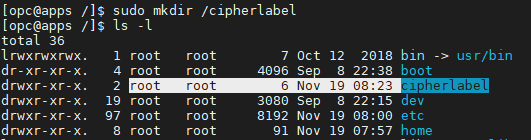
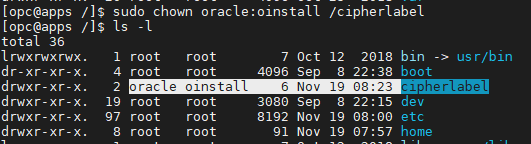
- The cipherlabel directory will need to have its owner and group changed to the same owner and group used by the user account used to run the EBS database. In our example the owner is the user oracle and the group is oinstall.
-
sudo chown oracle:oinstall /cipherlabel
-
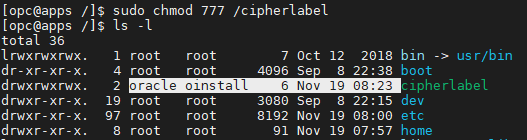
- It is important the OS service user account created in Setup EBS OS Service User Account is given full access to the cipherlabel label output directory. Your system security is likely stricter than ours, but for simplicities sake we will chmod the cipherlabel directory with full access. Check with your Linux administrator to set the appropriate ACL or security on your version of the cipherlabel directory so the OS service user account can have access to it read, write, and delete prvilages.
-
sudo chmod 777 /cipherlabel
-
Create Label DBA Directory
Now that the label output directory has been physically created on the OS, the DBA directory needs to be created. Execute the following steps to create the DBA directory.
In this example we will use XX_CIPHER_LABEL_DIR as the DBA directory. You can name this DBA directory anything you want.
- Log into the EBS database as the APPS user.
- Execute the following statement to create the DBA directory. The directory path is case sensitive and should match the full path on the server.
-
CREATE OR REPLACE DIRECTORY XX_CIPHER_LABEL_DIR AS '/cipherlabel';
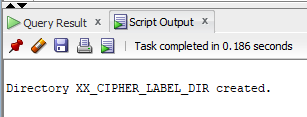
- If successful, you should get a success message similar to the one below.
-
Once the DBA directory is created you can use the following PL/SQL script executed as APPS to test if the database can successfully write a file to the label output directory. Again we are using XX_CIPHER_LABEL_DIR as the example DBA directory and /cipherlabel as the physical directory.
DECLARE
    --create a file pointer type variable
    lv_file         UTL_FILE.FILE_TYPE;
    --set the name of the test file
    lv_file_name    VARCHAR2(50) := 'dba_directory_test_file.txt';
    --set the name of the DBA Directory to test
    lv_dba_dir      VARCHAR2(50) := 'XX_CIPHER_LABEL_DIR';
BEGIN
    --associate file pointer variable to a file and open it for write operation
    lv_file    := UTL_FILE.FOPEN(lv_dba_dir, lv_file_name, 'w');

    --write a line to the file
    UTL_FILE.PUT_LINE(lv_file, 'Testing DBA Directory by writing a file.');

    --close the file pointer
    UTL_FILE.FCLOSE(lv_file);

    dbms_output.put_line('Success! Check directory for test file.');
EXCEPTION
    WHEN others THEN
        DBMS_OUTPUT.PUT_LINE('Error testing DBA directory:)) ');
        DBMS_OUTPUT.PUT_LINE('SQLERRM:' || SUBSTR(SQLERRM,1,250));
        DBMS_OUTPUT.PUT_LINE('SQLCODE:' || SQLCODE);
END;
If everything was setup correctly you should see the dba_directory_test_file.txt in /cipherlabel on the EBS server.
