Cipher comes with a Java stored procedure that needs to be loaded into the Oracle database. This allows for rest requests to be made to Cipher. This is a required library for both Cipher Freight and Cipher Label.
Once you have downloaded the Cipher-Oracle.zip from the Cipher application, upload the zip file to your EBS database server and unzip to a directory.
- sftp Cipher-Oracle.zip to a directory on the Oracle database server.
- e.g. /tmp
- Make a directory to unzip the Cipher-Oracle.zip.
- e.g. /tmp/cipher-oracle
-
mkdir /tmp/cipher-oracle
- Unzip Cipher-Oracle.zip to the directory you created.
- e.g. /tmp/cipher-oracle
-
unzip /tmp/Cipher-Oracle.zip -d /tmp/cipher-oracle/
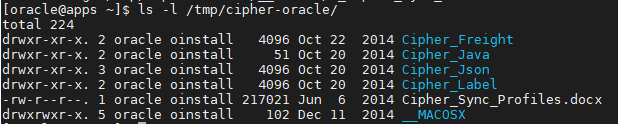
The contents of the zip file look as follows:
IMPORTANT: Before installing, ensure that you have run your Oracle database environment file to ensure that the loadjava methods can be found and will operate appropriately.
There are two ways to install the CipherRestRequest.java into the Oracle database. You only need to install it using one of the methods below.
- Using the Oracle class, oracle.aurora.server.tools.loadjava.LoadJavaMain.
- Using the Oracle loadjava utility.
The CipherRestRequest.java is in the Cipher_Java directory in the directory you unzipped the Cipher-Oracle.zip to.
Install Java Using LoadJavaMain.class
- Execute the LoadJavaMain.class to load the CipherRestRequest.java.
-
java -ms128m -mx256m oracle.aurora.server.tools.loadjava.LoadJavaMain -genmissing -force -thin -verbose -resolve -user APPS/<APPSPW>@<DBHOSTNAME>:<DBPORT>/<SID><UNZIP_DIR>/Cipher_Java/CipherRestRequest.java
- APPSPW: APPS password
- DBHOSTNAME: Oracle database hostname or IP Address
- DBPORT: Oracle database port
- SID: Oracle service identifier or service name
- UNZIP_DIR: The full path to the directory you unzipped the Cipher-Oracle.zip to
- e.g.
java -ms128m -mx256m oracle.aurora.server.tools.loadjava.LoadJavaMain -genmissing -force -thin -verbose -resolve -user apps/apps@132.145.205.111:1521/ebsdb /tmp/cipher-oracle/Cipher_Java/CipherRestRequest.java
-
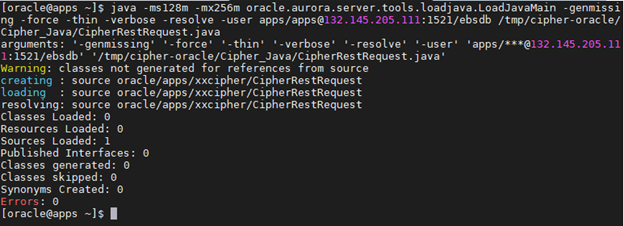
- The results will look like the following:
Install Java Using loadjava Utility
- Execute the loadjava utility to load the CipherRestRequest.java.
-
loadjava -resolve -force -verbose -user apps/<APPSPW>@<SID><UNZIP_DIR>/Cipher_Java/CipherRestRequest.java
- APPSPW: APPS password
- SID: Oracle service identifier or service name
- UNZIP_DIR: The full path to the directory you unzipped the Cipher-Oracle.zip to
- e.g.
loadjava -resolve -force -verbose -user apps/apps@ebsdb /tmp/cipher-oracle/Cipher_Java/CipherRestRequest.java
-
- The results will look like the following:
