Cipher uses a set of common controls for navigating and interacting with records. Most controls only become visible when mousing over a particular record, while others appear as buttons. Data is mostly returned in tables or interactive forms. The following is a brief description of the various controls found within Cipher.
Example of Tabular Records
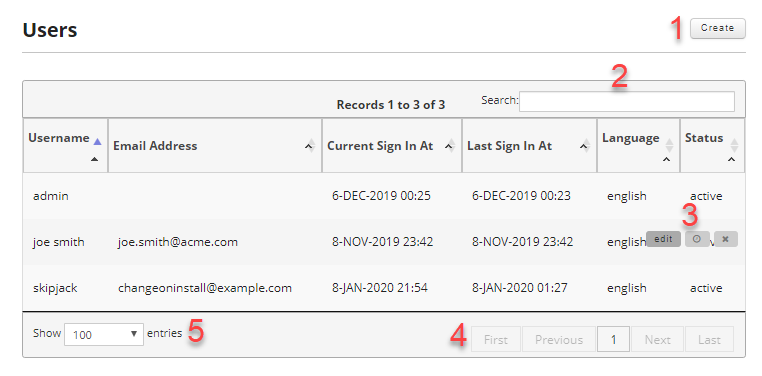
- Typically all new records can be inserted via a Create button. This button is always to the upper right of the table it controls.
- Records can be searched using the search box above the form. The search covers all fields in the table and results are filtered as soon as you start typing and update as typing continues.
- The controls to edit records, view created by and updated by information, and the deletion of records are revealed by moving your mouse over the individual records. Some tables have the check boxes that allow bulk editing.
- Once you have exceeded the max records allowed for a single page these controls activate and allow you to navigate the pages of results.
- Allows you to adjust the max records returned for a single page.
Example of Tabular Records with Checkboxes
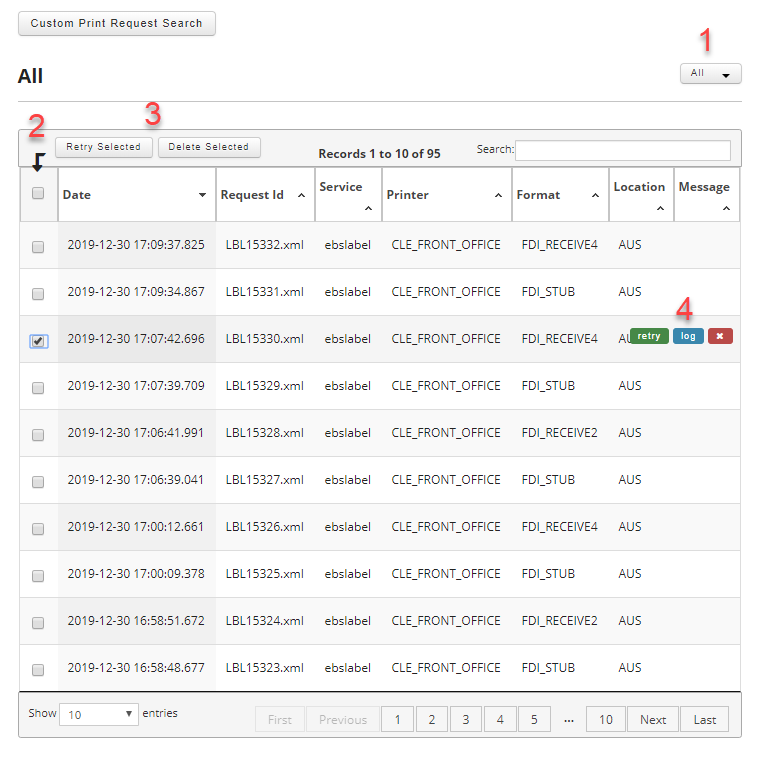
- Some result screens have a time and date selection drop down with a optional custom date search option.
- Some result screens have check boxes that allow for bulk actions.
- Additional control buttons can appear on some table results.
- Always look for mouse over controls. They will differ from result page to result page.