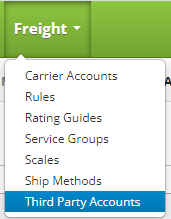
Update a Third Party Account by clicking on the Freight drop down menu on the main menu and clicking on Third Party Accounts
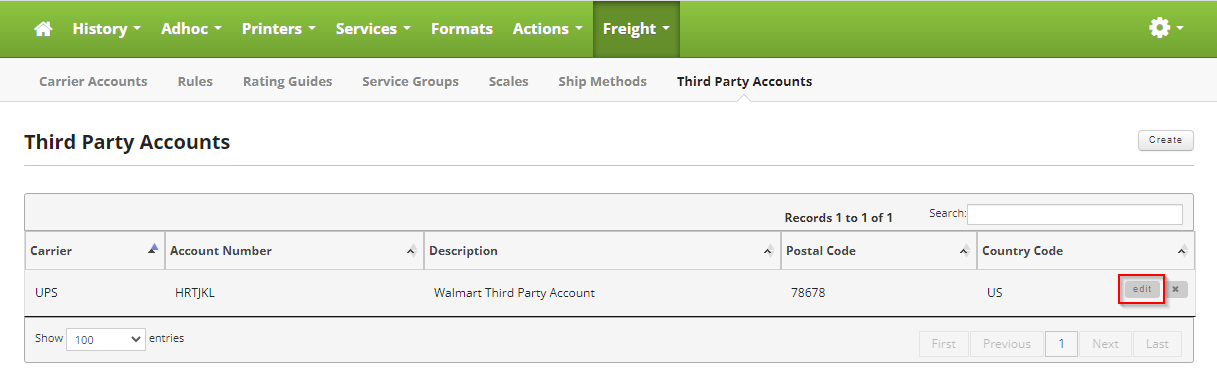
Once on the Third Party Accounts page, locate the Third Party Account you want to update and move your mouse over the Third Party Account to reveal the controls. Click on the edit button to edit the Third Party Account.
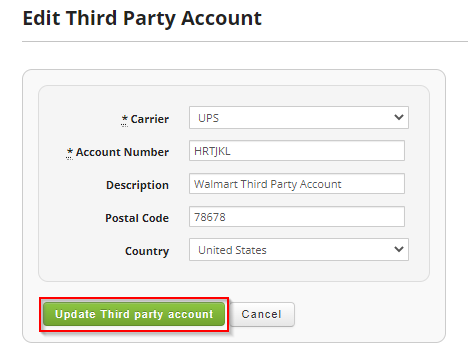
Make the changes you would like to make to the Third Party Account.
Fields:
- Carrier: Name for the Carrier associated with the account. Example Fedex, UPS etc.
- Account Number: The account number for the carrier, usually provided by the main company, example Walmart.
- Description: Best used to describe who the Third Party Account belongs to, for example "Walmart Third Party Account"
- Postal Code: Postal code you are shipping from.
- Country: Country you are shipping from.
Once you are satisfied, click on the "Update Third Party Account" button to update the Third Party Account.