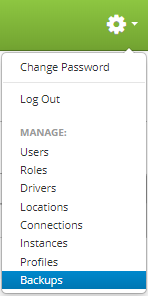
Backups are accessed by clicking the gear icon  in the upper right hand corner of the page and clicking on Backups.
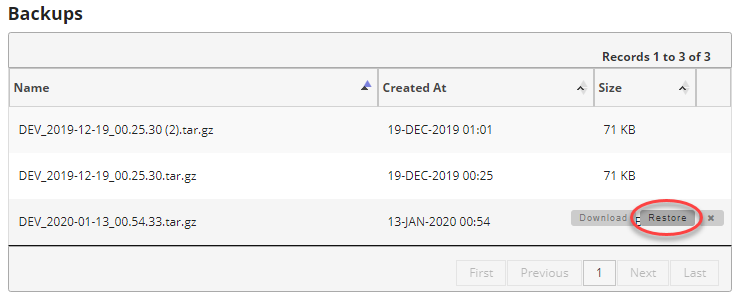
Once you are on the backups page, find the backup you want to restore and move your mouse over the backup to show the controls. Then click on the "restore" button to restore the backup.
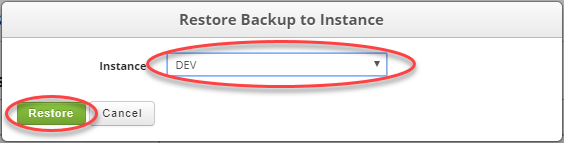
Select the instance you want to restore the backup too. This doesn't have to be the instance the backup was taken from. Again, backups can be used to migrate data from one instance to another.
Once you have selected the instance you want to restore to, click on the "Restore" button to perform the restoration.
You will get an HTTP alert box that will ask you one final time if you are sure you want to restore the backup.

Once the restore is finished you will receive a confirmation that the restoration was successful.

Alternatively you can restore a backup from a downloaded backup by locating the instance you want to restore and moving your mouse over the instance to reveal the controls. Then click on the "restore" button.
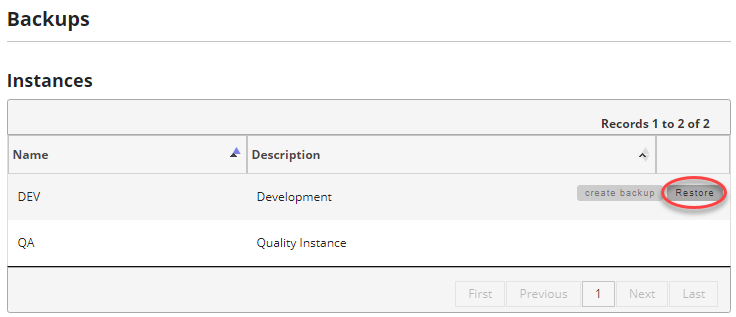
You can then either select from an existing backup on the server or click the "Choose File" button to select the backup you have previously downloaded. Once you have selected the file click the "Restore" button to restore your backup.
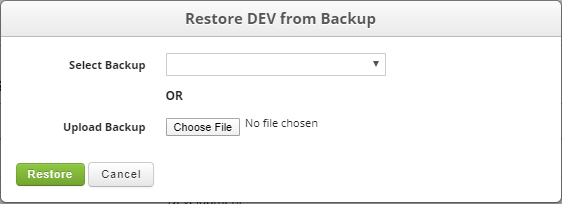
Again you will be prompted to confirm you want to restore the backup.
Once the restoration is completed you will get a confirmation.