Cipher is controlled by a number of global application profiles and settings. These are accessed by clicking on the gear icon  in the upper right hand of the screen and clicking on "Profiles" in the drop down.
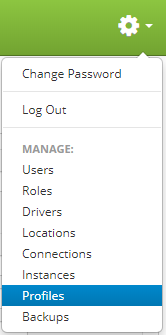
The intent of these settings is to provide control of the system by administrators on behalf of corporate policy owners.
Profiles Page

Fields:
- Cipher Key: When backups are created and exported the generated file is AES128 encrypted with the password defined in this profile. In order for a backup file to be restored into another instance of Cipher these passwords must match. The file is useless if the key's do not match preventing any company confidential information from being proliferated. The password is encrypted and encoded stored in the local Cipher appliance database.
- Cipher Hostname / URL: Related to Cipher Key, this is the host name or IP address of the target or source backup server.
- Format Source Required: When a user creates and uploads a format to Cipher the source (BTW) upload is optional by default. By setting this profile to "Y" the user is required to upload the BTW anytime a format is uploaded.
- Login Warning Banner: Any message entered into this box will be displayed above the login page.
- Printer Ping Allowed: In high security operations it may be desired to remove this capability. If unchecked the Ping button on the Printers Control page will not be viable.
- Save Request Logs: If checked this will save every print request log.
- Generated Error Message: If an error occurs anywhere in the application, this is the message that will appear to the user. This is a good place to put help desk information.
- Time Zone: This represents the primary system time zone. All print request time stamps and system log times will be in relation to this time zone setting.
- Session Inactivity Timeout: If a session hasn't had any activity for a pre-specified number of minutes the session will auto log out. The user will be given a 10 second warning prior to the logout.
- Print Request History Days: This is a system maintenance function that will auto-purge print request history. This interval will determine how long print request history is maintained in the Cipher database.
- Clear History Time: This is the time that clear history job runs that wipes out records that have expired per the Print Request History Days setting.
- Records per Results Page: This profile controls the number of results a user will be able to view per page on any page where records are returned.
- Portal Token: When using the Synchronous mode for print requests, this token is used for the web service call to Cipher. For more information on this topic see: Configure Cipher Profile Options.
SMTP Settings Fields:
The SMTP Settings allow cipher to send out e-mails when needed to specified users. Make sure these settings are set in order to avoid SERVER 500 errors when an e-mail is needed to be sent.
- Address: The address of your SMTP server.
- Port: The port of your SMTP server.
- Domain: Your SMTP server domain.
- Username: The username needed to access your SMTP server.
- Password: The password needed to access your SMTP server.
- Authentication: The authentication token needed by your SMTP server if required.