Cipher's administration is accessed by clicking the gear icon  in the upper right hand corner of the page in the main menu bar.
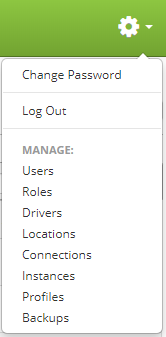
Depending on the roles assigned to your user, the number of items under "Manage" may differ from the menu shown above. Below is a brief description of each administrative function.
- Change Password
Allows you to change the current user password. - Log Out
Allows you to log out. - Users
Administers users. - Roles
Administers user roles. - Drivers
Administers printer drivers. - Locations
Administers locations for your printers. A location can be a whole site, department, area, etc. It is just a logical location to organize your printers. - Connections
Administers database connections. - Instances
Administers Cipher instances. An instance is the equivalent to an environment with its own printers, formats. - Profiles
Administers Cipher wide settings and application profiles. - Backups
Create, restore, and download backups.